On this page8 sections
1. Why Test Password Reset Links With Disposable Inboxes
To test password reset email link workflows safely, QA engineers must isolate credential delivery from human mailboxes and verify token lifecycles under strict test conditions. A password reset email carries a high-entropy secret that grants total account access. Testing that flow against personal accounts or shared staging inboxes frequently leads to expired tokens, false test positives, and accidental account lockouts.
By using a dedicated disposable inbox for each test cycle, you ensure that every incoming message is immediately accessible via API, scoped to a single run, and purged automatically. When you test password reset email link endpoints, you avoid polluting durable email stores with transient authentication secrets.
Two distinct mailbox architectures exist for test automation:
- Email Aliases: Plus-addressed aliases (such as
qa+run1@company.com) forward directly into a durable mailbox. They persist indefinitely, can be read by team members, and are often proactively scanned by enterprise security filters that consume one-time tokens prematurely. - Disposable Inboxes: Short-lived, isolated mailboxes generated on demand via an API (such as Tempmail's programmatic addresses). They receive mail through live SMTP routes, expose webhooks and REST endpoints, and expire automatically after evidence collection.
For routine marketing campaigns, an alias is sufficient. But whenever you test password reset email link single-use enforcement, token replay, or rapid expiration, an isolated disposable inbox is essential to maintain security boundaries.
2. Credential Failure Modes You Must Test
Unlike regular transactional notifications, a password recovery message is a critical security transaction. Authoritative guidance from Campaigner stresses that recovery messages should be minimal and must never transmit plaintext passwords. Similarly, Mailtrap's reset guide highlights strict time-to-live (TTL) limits and single-use enforcement as primary safeguards.
A comprehensive QA test suite must validate five distinct failure modes:
- Token Replay Vulnerability: A user clicks the link, successfully resets their password, and navigates back. Does the server accept the identical URL a second time? If yes, that represents a critical security defect.
- Premature or Missing Expiration: When a policy states a 15-minute validity window, the token must be accepted at 14 minutes and strictly rejected at 16 minutes.
- Reissue Invalidation: If a user requests two password resets in quick succession, does the issuance of the second token immediately invalidate the first?
- Environment Leakage: Does a staging password reset email link accidentally resolve to a production host, or vice versa?
- Silent Prefetch Consumption: Corporate antivirus scanners and email clients often pre-fetch URLs in the background. If your application consumes the token on
GETrather than requiring a form submission onPOST, the link becomes invalid before the real user ever clicks it.
3. Inventory the Token Policy Before Testing
Before scripting automated checks, catalog your application's documented token handling rules. Testing against assumptions creates brittle tests and ambiguous defect reports. Refer to the OWASP Forgot Password Cheat Sheet for baseline security recommendations.
| Policy Dimension | Recommended Standard | QA Assertion Goal |
|---|---|---|
| Token Lifespan (TTL) | 15 to 60 minutes max | Verify acceptance before TTL and rejection immediately after |
| Single-Use Rule | Burn token upon successful reset | Assert HTTP 400 or 403 on second attempt |
| Superseded Reissue | Invalidate previous token on new request | Confirm earlier link fails immediately when new link is generated |
| Transport Security | HTTPS only, no parameters in fragment | Check scheme, domain, path, and TLS requirements |
Always record your system clocks: runner machine time, application server time, and email delivery latency. Clock skews between your test runner and database can distort boundary assertions.
4. Choosing a Safe Email Capture Method
To safely test password reset email link flows, you must balance end-to-end realism against test isolation. As noted in the Ministry of Testing password challenge, message retrieval is often the primary bottleneck in QA automation.
The matrix below compares the standard approaches:
| Capture Method | Strengths | Limitations | Recommended Use |
|---|---|---|---|
| Ephemeral REST Inbox | Tests real SMTP delivery, isolated, fully scriptable | Depends on external network access | Staging and end-to-end integration tests |
| Local SMTP Sink (MailHog) | Fast, local, offline capability | Bypasses production MX and reputation checks | Local developer loops and fast unit tests |
| Mocked In-Memory Stubs | Instantaneous execution, zero flakiness | Does not test message body parsing or real links | Component UI rendering tests |
Using an API-driven ephemeral inbox provides the highest degree of confidence because the application actually dispatches email through its real delivery pipeline.
5. 7 Steps to Test Password Reset Email Links Safely
Follow this end-to-end process to systematically test password reset email link behavior in your integration test suite.
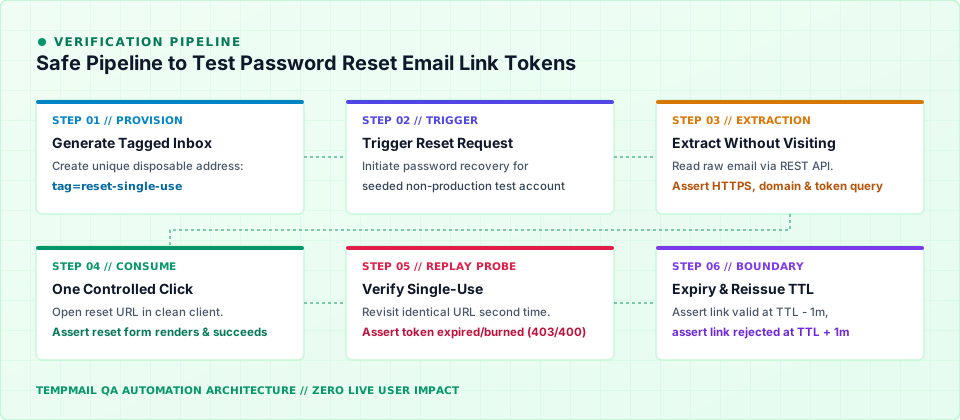
Step 1: Provision an Isolated Tagged Address
Generate a tagged, disposable address using the Tempmail API. Assign a unique execution tag such as reset-run-482 to ensure no overlapping tests contaminate the mailbox:
# Create an isolated mailbox via the developer API
curl -s -X POST "https://api-testmail.codaipro.com/api/emails/generate?tag=reset-single-use"
Step 2: Trigger Exactly One Password Reset
Invoke your application's forgot-password endpoint for a seeded, non-production test account. Record the exact server timestamp and the expected destination address.
Step 3: Poll the API and Extract the Link Without Visiting It
Query the inbox messages using the REST endpoint. Do not visit the URL yet. Visiting the link prematurely will corrupt single-use checks and prefetch detection.
# Retrieve messages matching the test tag
curl -s -G "https://api-testmail.codaipro.com/api/emails/" \
  -H "X-Mailbox-Key: $MAILBOX_KEY" \
  --data-urlencode "tag=reset-single-use" \
  --data-urlencode "subject_contains=Password Reset"
Step 4: Inspect the URL Structure
Parse the reset link from the raw HTML or text body. Validate the following parameters before performing any HTTP requests:
- Protocol must strictly be
https://. - Host must match your current test environment (never production).
- Path must adhere to the documented route (e.g.,
/auth/reset-password). - Token parameter must contain an unpredictable, high-entropy string.
- The email body must never include the user's password or sensitive account details.
Step 5: Perform Exactly One Controlled Click
Using a clean browser session (or Playwright context with empty cookies and storage), navigate to the reset URL. Verify that the password update form renders properly with appropriate password strength indicators.
Step 6: Submit the New Password and Validate Login
Complete the password change form with valid credentials. Verify that the form submits successfully, updates the database, and enables immediate authentication with the new password.
Step 7: Perform the Replay Assertion
Immediately attempt to navigate to the exact same reset URL in an incognito window. The application must reject the request with a clear error indicating the token has expired or has already been used.
6. Asserting Single-Use, Expiry, and Reissue
When engineering automated suites to test password reset email link rules, test each token lifecycle boundary independently. Consuming a token alters state irrevocably, meaning each boundary check requires a freshly seeded trigger.
| Lifecycle Scenario | Execution Strategy | Expected Response |
|---|---|---|
| Immediate Replay | Revisit link 5 seconds after successful password reset | HTTP 400 / 403 or redirect to invalid token notice |
| Near-Expiry Window | Simulate time elapsed to TTL minus 1 minute (via mocked clock) | HTTP 200: Token remains valid and form displays |
| Post-Expiry Window | Simulate time elapsed to TTL plus 1 minute | HTTP 400 / 410: Token rejected as expired |
| Consecutive Reissue | Trigger reset #1, then reset #2, then attempt reset #1 | Reset #1 invalidated; reset #2 succeeds |
For more architectural details on disposable inbox lifecycles and retention limits, read our guide on why 10-minute ephemeral inboxes matter and explore our hands-on tutorial on testing transactional emails in QA.
7. Detecting Link Prefetch & Scanner Consumption
A prevalent edge case encountered when you test password reset email link deliverability is token burnout caused by aggressive link scanners. Many corporate email filters automatically follow hyperlinks found inside inbound messages to scan for malicious redirects.
If your application invalidates or consumes a password reset token on the initial GET request, the link scanner will consume the token before your recipient ever opens their inbox. When the human user clicks the button, they receive an error saying their link has expired.
To prevent this vulnerability:
- Keep GET Requests Idempotent: The
GETrequest should only serve the HTML password reset form. It must never alter the user's password or destroy the token. - Consume Tokens on POST: Only finalize and invalidate the token when the user explicitly submits new credentials via an authenticated
POSTrequest. - Utilize Anti-Automation Checks: For sensitive environments, implement subtle CSRF tokens or interaction prompts on the reset landing page.
8. Safe Automation Rules & FAQ
To maintain security and test hygiene across your continuous integration pipelines, always adhere to these operational ground rules:
- Never Use Real User Inboxes: Run token verification exclusively against seeded test accounts within non-production environments.
- Redact Sensitive Tokens: Never write raw password reset links or authorization tokens to build artifacts, console logs, or bug tracking tickets. Store only the hashed or truncated token reference.
- Use Header-Based Authentication: When accessing the Tempmail API, supply credentials via the
X-Mailbox-Keyheader rather than URL query parameters to prevent leakage in server access logs. - Validate Real Delivery: Use our interactive Email Tester Tool to verify SPF, DKIM, and deliverability headers before running end-to-end token tests.
Frequently Asked Questions
How do I prevent flaky tests due to email delivery latency?
Rather than relying on fixed sleep() intervals, implement polling loops with exponential backoff or use real-time Server-Sent Events (SSE) to subscribe directly to inbox arrivals.
Can I test password resets in production?
Only against dedicated staging or internal test accounts specifically designated for automated monitoring. Never perform destructive token operations against live customer records.
What is the ideal validity window for a password reset token?
Most industry standards, including OWASP and Mailtrap recommendations, advocate for an expiration window between 15 and 60 minutes. Shorter windows reduce the risk of interception while providing ample time for delivery.

About the author
Software Engineer & Backend Lead at Codaipro
Software Engineer and Backend Lead at Codaipro specializing in Python, distributed architecture, and email testing infrastructure. Researches E2E QA automation and ephemeral systems.
Tempmail is the product this team builds. Our editorial policy covers sourcing, testing, corrections, and how we disclose that relationship.
Sources & further reading
- 01API Reference — Free Developer Temp Mail REST & SSE Endpoints (opens in a new tab)
- 02Documentation — Setup, Deploy & Configure Tempmail (opens in a new tab)
- 03Reset Password Email Template: Rules and Best Practices — Mailtrap (opens in a new tab)
- 04What is Password Reset Email? — Campaigner (opens in a new tab)
- 05Forgot Password Cheat Sheet — OWASP (opens in a new tab)
- 06Tester Challenge: What do you do to test reset password — Ministry of Testing (opens in a new tab)
Try it without signing up
The address on the home page is ready in a second. Copy it, use it anywhere, and read the reply here — no account, no ads.