On this page7 sections
1. Why Playwright Email Verification Requires Isolated Inboxes
To automate playwright email verification without flaky test failures, QA engineers must isolate inbox lifecycles and bind message polling to explicit test runs. Email delivery is an eventually consistent process. A browser test can submit a registration form in milliseconds, but SMTP transport, anti-spam filters, and queue delays mean the verification email arrives asynchronously.
When running continuous integration pipelines with parallel workers, shared test mailboxes trigger severe race conditions. Two concurrent workers polling the same inbox will consume or misattribute each other's activation codes. Implementing reliable playwright email verification requires dedicating an ephemeral, uniquely tagged address to every individual test context.
Three common defects cause verification tests to flake:
- Unbounded Timeouts: Tests that poll indefinitely or fail immediately without giving SMTP relays reasonable delivery headroom.
- Shared Inbox Collisions: Parallel Playwright workers intercepting messages intended for another test runner.
- Stale Message Consumption: Assertions passing against an old email sent during a previous CI build rather than the message generated by the active run.
2. The Core Anti-Flake Verification Pattern
The solution to flaky email automation is not adding arbitrary page.waitForTimeout() sleeps. Fixed sleeps slow down test suites and fail when network conditions vary. Instead, use a deterministic, five-phase verification pipeline:
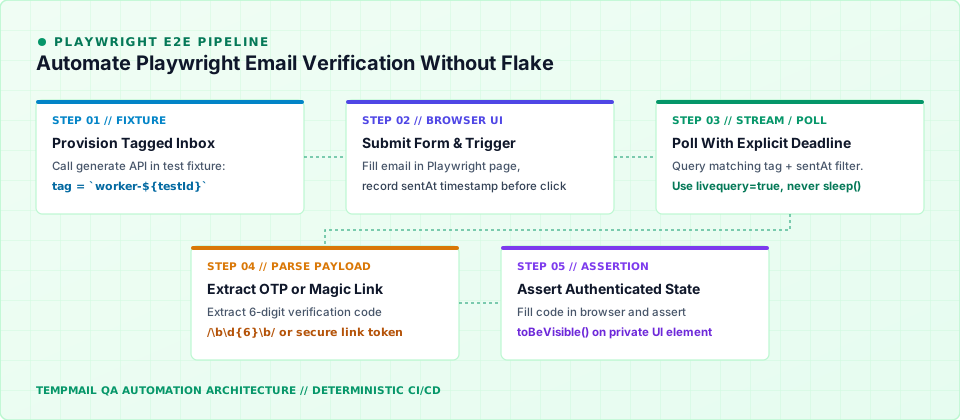
- Provision Isolated Inbox: Generate a unique address with a worker-specific tag (e.g.,
worker-2-a8f9) before launching the browser action. - Trigger & Timestamp: Record the exact
sentAtclient timestamp immediately before clicking the form submit button. - Filtered Long-Poll: Query the email API specifying the unique tag and a strict deadline. Use server-side waiting (such as Server-Sent Events or long-polling) instead of busy loops.
- Payload Extraction: Extract the 6-digit OTP or magic link from the raw message body using robust regular expressions.
- Authenticated UI Assertion: Complete the verification form in Playwright and assert an element only visible to logged-in sessions (e.g., user avatar or private dashboard).
3. Temporary Inboxes vs Shared Mailbox Anti-Patterns
Choosing the right mailbox architecture determines whether your end-to-end suite stays stable at scale. Authoritative testing research from the Nylas E2E email testing guide identifies shared test inboxes as the single leading cause of flaky email integration tests.
| Mailbox Model | Cross-Test Collision Risk | Parallel CI Readiness | Recommended Decision |
|---|---|---|---|
| Ephemeral Tagged Inbox | Zero: Each test owns an isolated namespace and tag | Excellent (supports 50+ parallel workers) | Recommended standard |
| Shared IMAP/SMTP Inbox | High: Race conditions when polling shared folders | Poor (workers overwrite state) | Anti-pattern for CI |
| Email Aliasing (plus-addressing) | Moderate: All messages route to single permanent inbox | Limited by provider rate limits | Local development only |
According to Playwright's official authentication guide, tests mutating server-side user state must isolate credentials between test cases. Utilizing ephemeral disposable addresses satisfies this requirement without administrative overhead.
4. 5 Steps to Automate Playwright Email Verification Without Flake
Follow these five actionable steps to build deterministic playwright email verification routines into your test suite.
Step 1: Generate an Address Fixture
Call the Tempmail API to provision a unique temporary email before the test runs. Using unique tags guarantees that messages never leak across workers:
# Generate a tagged inbox for the current Playwright worker
curl -s -X POST "https://api-testmail.codaipro.com/api/emails/generate?tag=pw-worker-1"
Step 2: Submit the Registration Form in Playwright
Fill out the signup form in your application under test. Capture the timestamp right before triggering submission to ensure old messages cannot satisfy your test assertion:
const sentAt = Date.now();
await page.getByLabel('Work Email').fill(mailbox.email);
await page.getByRole('button', { name: /create account/i }).click();
Step 3: Poll the Messages API With Bounded Retries
Query the messages endpoint using the tag parameter. Avoid unbounded while loops; specify a maximum deadline (e.g., 20 seconds) and retry with exponential backoff.
Step 4: Extract the Verification Token or OTP
Parse the response text. For 6-digit numeric codes, extract the code with /\b\d{6}\b/. For magic links, validate that the domain matches your staging environment before navigating.
Step 5: Complete Verification and Assert Session State
Enter the verification code in the browser and assert that the application transitions to an authenticated dashboard URL, confirming complete user activation.
5. Complete Playwright Test Implementation Recipe
Below is a production-ready TypeScript implementation for automated playwright email verification using the Tempmail REST API and Playwright Test fixtures:
import { test, expect, type APIRequestContext } from '@playwright/test';
import { randomUUID } from 'node:crypto';

const API_BASE = process.env.TEMPMAIL_API_BASE_URL ?? 'https://api-testmail.codaipro.com';

interface Mailbox {
  email: string;
  tag: string;
}

// Custom fixture to provision and teardown ephemeral inboxes
async function createWorkerInbox(request: APIRequestContext, workerId: number): Promise<Mailbox> {
  const tag = `pw-${workerId}-${randomUUID().slice(0, 8)}`;
  const res = await request.post(`${API_BASE}/api/emails/generate?tag=${tag}`, {
    headers: { Authorization: `Bearer ${process.env.TEMPMAIL_API_KEY}` }
  });
  expect(res.status()).toBe(201);
  return (await res.json()) as Mailbox;
}

test('user signs up and completes email verification', async ({ page, request }, testInfo) => {
  const mailbox = await createWorkerInbox(request, testInfo.workerIndex);

  await page.goto('/signup');
  await page.getByLabel('Email Address').fill(mailbox.email);
  await page.getByLabel('Password').fill('SecureP@ssword2026!');

  const sentAt = Date.now();
  await page.getByRole('button', { name: /sign up/i }).click();

  // Bounded poll with 20-second timeout
  let verificationCode = '';
  const deadline = Date.now() + 20000;

  while (Date.now() < deadline) {
    const res = await request.get(`${API_BASE}/api/emails/?tag=${mailbox.tag}&livequery=true`, {
      headers: { Authorization: `Bearer ${process.env.TEMPMAIL_API_KEY}` }
    });

    if (res.ok()) {
      const data = await res.json();
      const messages = Array.isArray(data) ? data : data.messages ?? [];
      const match = messages.find((m: any) => m.created_at >= sentAt || !m.created_at);

      if (match) {
        const otpMatch = (match.text_body ?? match.body ?? '').match(/\b\d{6}\b/);
        if (otpMatch) {
          verificationCode = otpMatch[0];
          break;
        }
      }
    }
    await page.waitForTimeout(1000);
  }

  expect(verificationCode, 'Verification code was not received in time').toMatch(/^\d{6}$/);

  // Fill OTP code and assert authenticated session
  await page.getByLabel(/verification code/i).fill(verificationCode);
  await page.getByRole('button', { name: /confirm/i }).click();

  await expect(page).toHaveURL(/\/dashboard/);
  await expect(page.getByRole('heading', { name: /welcome/i })).toBeVisible();
});
6. Parsing OTP Codes, Magic Links & Security Boundaries
Applications implement email verification via two primary authentication mechanisms:
- Numeric One-Time Passwords (OTP): Short 6 or 8-digit codes adhering to standards like RFC 6238. These are resilient against URL pre-fetching because they require explicit keyboard entry in the browser form.
- Magic Links / Action URLs: One-click hyperlinks that instantly authenticate the user. These require extra care in QA: corporate mail scanners often pre-fetch hyperlinks, potentially consuming single-use tokens before Playwright can click them.
When handling magic links in automated tests, parse the link origin and query parameters with new URL(link) before navigating. Never execute links that resolve to production domains during test runs. For detailed guidelines on testing link token lifecycles and single-use expiry, consult our companion guide on testing password reset email links safely and learn more about our architectural foundation in why 10-minute ephemeral inboxes matter.
7. Flake Diagnostics & FAQ
When an email test fails in CI, inspect these diagnostic indicators before modifying timeouts:
| Observed Symptom | Root Cause | Remediation Action |
|---|---|---|
| Timeout after 20 seconds | Outbound mail queue delayed or SMTP server blocked | Test deliverability using our interactive Email Tester Tool |
| Wrong code submitted | Shared inbox without unique worker tag | Ensure tag includes worker ID and UUID |
| Link expired immediately | Mail server prefetch consumed token on GET | Ensure token consumption happens on authenticated POST |
Frequently Asked Questions
Should I mock transactional emails or test them end-to-end?
Mock emails during fast unit tests and UI component testing. Use real ephemeral inboxes for end-to-end smoke tests to verify the complete delivery pipeline, queue health, and template rendering. See our comprehensive guide on testing transactional emails in QA for full architecture recommendations.
How do I handle CI secrets for email testing?
Store your API keys in environment variables (such as TEMPMAIL_API_KEY). Supply them via request headers rather than query strings to keep credentials out of server access logs and Playwright trace files.
What is the recommended timeout for email delivery in CI?
Set a deadline between 15 and 30 seconds. In healthy staging environments, emails typically arrive within 2 to 5 seconds. If delivery regularly exceeds 30 seconds, investigate downstream SMTP queue latency.

About the author
Software Engineer & Backend Lead at Codaipro
Software Engineer and Backend Lead at Codaipro specializing in Python, distributed architecture, and email testing infrastructure. Researches E2E QA automation and ephemeral systems.
Tempmail is the product this team builds. Our editorial policy covers sourcing, testing, corrections, and how we disclose that relationship.
Sources & further reading
- 01Playwright Authentication Guide (opens in a new tab)
- 02Nylas End-to-End Email Testing Guide (opens in a new tab)
- 03Tempmail API Reference (opens in a new tab)
- 04Tempmail Documentation (opens in a new tab)
- 05Mailsac Playwright Email Testing (opens in a new tab)
- 06RFC 6238 — Time-Based One-Time Password Algorithm (opens in a new tab)
Try it without signing up
The address on the home page is ready in a second. Copy it, use it anywhere, and read the reply here — no account, no ads.